Every engineering entrance exam — JEE Main, JEE Advanced, BITSAT, the state CETs, the university-specific tests — asks for roughly the same documents in roughly the same formats. The catch is the word "roughly." Each form has its own small specifications, and even small mismatches (a photo that's 3.5cm by 4.5cm instead of 3.5cm by 4.5cm at a specific DPI) can cause a rejection at upload.
This checklist is meant to be done once, at the start of the application season. If you put together a clean folder of correctly-formatted documents in November, you can apply to every exam through April without repeating the work.
Note: This article is written to be evergreen, but specific dates, fees, eligibility thresholds, and procedural details are set each year by the relevant authority — NTA, JoSAA, BITS Pilani, HSTES, or the institute concerned. Always cross-check the latest official notification before acting on anything time-sensitive.
The folder you should build
We recommend a simple folder on your computer named something like "Engineering Forms 2026", with subfolders for each document type. Save originals AND any formatted versions side by side.
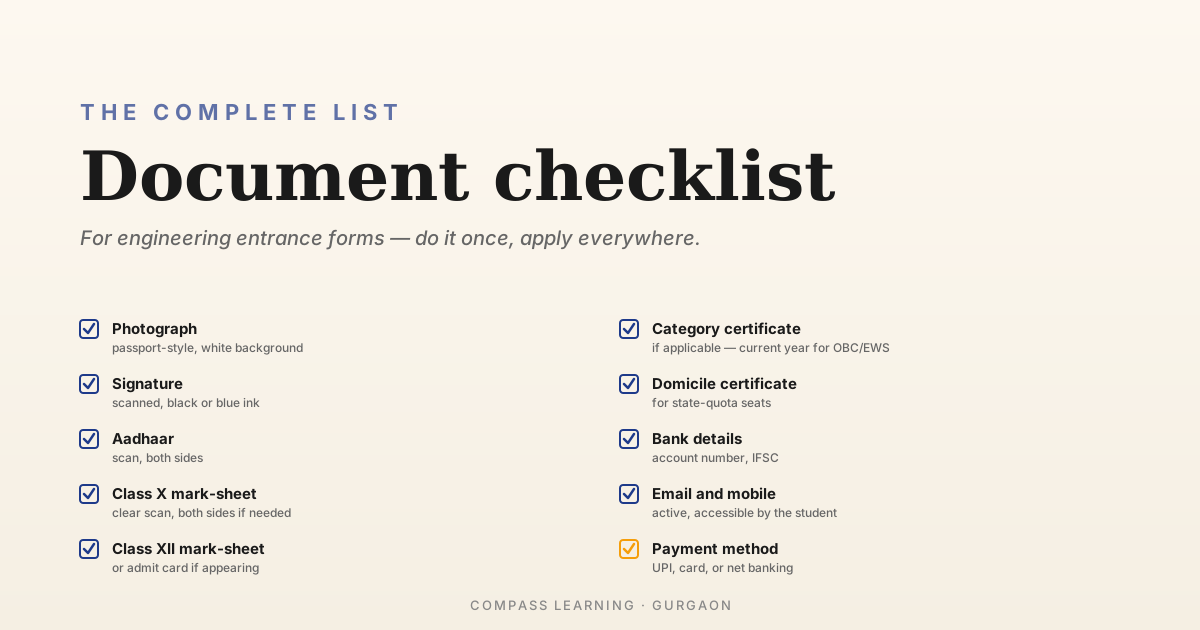
Here's the complete list of documents most engineering entrance forms ask for. Not every form asks for every document, but having all of these ready means you're prepared for any form.
Photograph
The photograph is the most common cause of upload rejections. Get this right once and copy it everywhere.
General specifications used by NTA (JEE Main):
- Format: JPG or JPEG.
- Background: White or very light grey. Not a coloured wall, not a busy background.
- Dimensions: Typically 3.5 cm × 4.5 cm at a specified DPI. The portal usually shows the exact required width and height in pixels (e.g., between 80 KB and 200 KB).
- Face: Centered, looking straight at the camera, neutral expression, both ears visible if possible, no spectacles with reflective glare.
- Recency: Taken within the last six months.
- Style: Passport-style, not a selfie, not a casual photograph.
Where to get it done: Any reputable photo studio. Tell them it's for "JEE/government exam application" — they'll know the format. Most studios provide both printed copies and a soft copy on a pen drive. Get both.
File size: Most forms require the file under 200 KB. If your scanned photo is larger, compress it using a free online tool (or right-click → Save As Image → choose a lower quality). Don't reduce dimensions; just compression.
One photograph, multiple uses: A single high-quality photograph file, in the right dimensions, can be used across nearly every engineering form. Just keep checking the file-size limit for each portal.
A few extra physical prints: Studio photographs usually come in sets of 8 or 12. Keep these in a labelled envelope — you'll need physical prints for counselling reporting and for some offline document verifications.
Signature
Less troublesome than the photo, but still has rules:
- On white paper, in black or dark blue ink.
- Within a 3 cm × 6 cm box (rough proportions — most forms specify exact dimensions).
- Sign normally, not in a hurry, not too small.
- Scan or photograph it, crop tightly around the signature, save as JPG.
- File size: usually under 30 KB.
The signature should look like the same signature you'd use on any official document — bank, school records, etc. Inconsistency in signatures across documents can be flagged later.
Identity proof (Aadhaar)
Most engineering entrance forms accept Aadhaar as the primary identity proof. Have a clear scan ready:
- A scan of both sides of the Aadhaar card (or the downloaded e-Aadhaar PDF).
- The number itself memorised — many forms ask you to type the number into a field for verification.
If Aadhaar is not available, alternatives accepted by most forms include passport, voter ID, ration card with photograph, or a school ID card with photograph and date of birth.
Class X mark-sheet or certificate
You'll need this for almost every form:
- A clear scan of the front and back, if both sides have content.
- PDF format is usually fine, but some forms ask for JPG. Have both versions ready.
- The form will often ask you to enter the exact percentage or CGPA from the mark-sheet. Don't round — enter exactly what's printed.
If your Class X mark-sheet has any unusual feature (a board name that's spelt slightly differently from the dropdown, a percentage calculated unusually), keep the original document handy in case a clarification is needed during verification later.
Class XII mark-sheet or admit card
Two situations:
- You've already passed Class XII — keep a clear scan of the mark-sheet ready.
- You're currently in Class XII (appearing) — you'll mark "appearing" on the form. After your Board results come out, the form portal will ask you to update with the marks. Keep your Class XII admit card ready for the initial application as proof of registration.
For the percentage / CGPA fields, the same advice applies: enter exactly what's on the document.
Category certificate (SC / ST / OBC-NCL / EWS / PwD)
If you're applying under a reserved category, the category certificate is the most carefully checked document in the process. Get this right, in original.
A few critical points:
- OBC-NCL certificates must be issued in the current financial year. A certificate from two years ago won't be valid. Get a fresh one well before the JEE Main application window opens.
- EWS certificates also require annual renewal. Same rule.
- SC/ST certificates issued earlier are usually valid for longer, but again — the bulletin is the authoritative source.
- The certificate must be in the candidate's name, not the parent's, and must specify the candidate's category and any non-creamy-layer status.
- The issuing authority must be one of the officers recognised in the bulletin (Tehsildar, SDM, etc.). Certificates from unrecognised officers are rejected.
PwD certificates require:
- A medical board's certificate specifying the percentage of disability.
- The minimum percentage threshold for entrance-exam benefits is set in the bulletin (typically 40%, but check).
Get the certificate well in advance. The process of obtaining it from the relevant office can take weeks; don't start in November expecting to have it by the form deadline.
Domicile certificate
For state quota seats in state engineering exams (UPCET, MHT-CET, KCET, etc.), you may need a domicile certificate proving you're a resident of the relevant state.
For Delhi NCR families, this is the most common source of confusion: a student living in Gurgaon (Haryana) but going to school in Delhi may need to think about which state's domicile to claim, depending on which state quotas they want to be eligible for.
The certificate is issued by the local revenue authority and takes a few weeks to obtain. Get it before the application window opens.
Bank details
Some forms ask for bank account details — usually for fee refunds (in case of overpayment or duplicate submission). Have ready:
- Account holder's name (the student's name).
- Account number.
- IFSC code.
A scanned copy of a cancelled cheque or the front page of the passbook is sometimes asked for.
Email ID and mobile number
This isn't a document, but it's worth flagging:
- Use an email ID that the student has active access to. Many parents register their own email; this works but can mean important messages don't reach the student.
- Use a mobile number that's reachable on exam day. SMS notifications come to it.
- These details, once registered, are hard to change later. Get them right at registration.
A quick "go / no-go" check
Before sitting down to fill any engineering entrance form, run through this list:
- Passport-sized photo, scanned, under 200 KB, white background, recent
- Signature on white paper, scanned, black/blue ink, under 30 KB
- Aadhaar card scan
- Class X mark-sheet scan
- Class XII mark-sheet or admit card scan
- Category certificate (if applicable), issued in the current financial year for OBC-NCL/EWS
- Domicile certificate (if going to apply for state-quota seats)
- Bank account details ready
- Active email ID and mobile number that the student has access to
- Payment method ready (UPI, card, or net banking)
If all of these are ticked, you're set to fill a form in about an hour without scrambling.
On scanning and formatting
A few practical tips on the mechanical side of this work:
- Use a flatbed scanner or a phone scanning app (Adobe Scan, Microsoft Lens, Google Drive's scan feature). Phone-camera photographs of documents are often too dark or warped.
- Save originals separately. Once you've created a "right size" version, keep the original high-resolution scan too — you may need it at a different size for a different form.
- Don't reduce dimensions when shrinking file size; reduce quality/compression. A 100 KB photograph that's been crushed to grainy pixels is worse than a 200 KB photograph at full quality.
- Free tools like PDF24, ILovePDF, or any small image compressor work well. No need for paid software.
Where to read next
For filling the form: How to Fill the JEE Main Application Form: Step-by-Step.
For what JEE Main is: JEE Main: A Complete Guide.
For the bigger picture: The Engineering Admissions Roadmap.
Have questions about your specific situation?
We're at Ardee City, Sector 52, Gurgaon. Drop by anytime, or give us a call. Always happy to chat through strategy with parents and students — no pitch, no pressure, just a conversation about what makes sense for you.