Filling the JEE Main application form is one of the small bureaucratic moments that determines a year of stress or calm. Mistakes made here — a misspelt name, a wrong photo, a category certificate that doesn't quite match — can take weeks to fix and occasionally can't be fixed at all. This guide walks through the form step by step, with the small details that are easy to miss.
Before we start: this article covers the standard JEE Main application flow as it has been in recent years. NTA tweaks the portal slightly each year — a new field, a redesigned section. The broad structure stays the same, and the principles in this guide apply across years. For this year's exact dates and any new fields, check NTA's information bulletin alongside this guide.
Note: This article is written to be evergreen, but specific dates, fees, eligibility thresholds, and procedural details are set each year by the relevant authority — NTA, JoSAA, BITS Pilani, HSTES, or the institute concerned. Always cross-check the latest official notification before acting on anything time-sensitive.
Before you sit down to fill
The single best preparation is to have everything ready before you start. Half the form-filling stress comes from running to find a scanned mark-sheet or fetch the correct photo specs in the middle of the application.
We've put together a complete Document Checklist for Engineering Entrance Forms that covers every document, with exact specifications. The short version:
- A scanned passport-size photograph in the right format and dimensions.
- A scanned signature.
- Aadhaar (and an alternative ID if not available).
- Class X mark-sheet (or admit card, depending on what's asked).
- Class XII mark-sheet (or admit card if you haven't completed XII).
- Category certificate, if applicable (SC/ST/OBC-NCL/EWS/PwD).
- A working email ID and mobile number that you actively use (the student, not a parent's — many notifications come to these).
- A means of online payment (UPI, debit card, credit card, or net banking).
Read the checklist before starting. It saves an hour of fumbling.
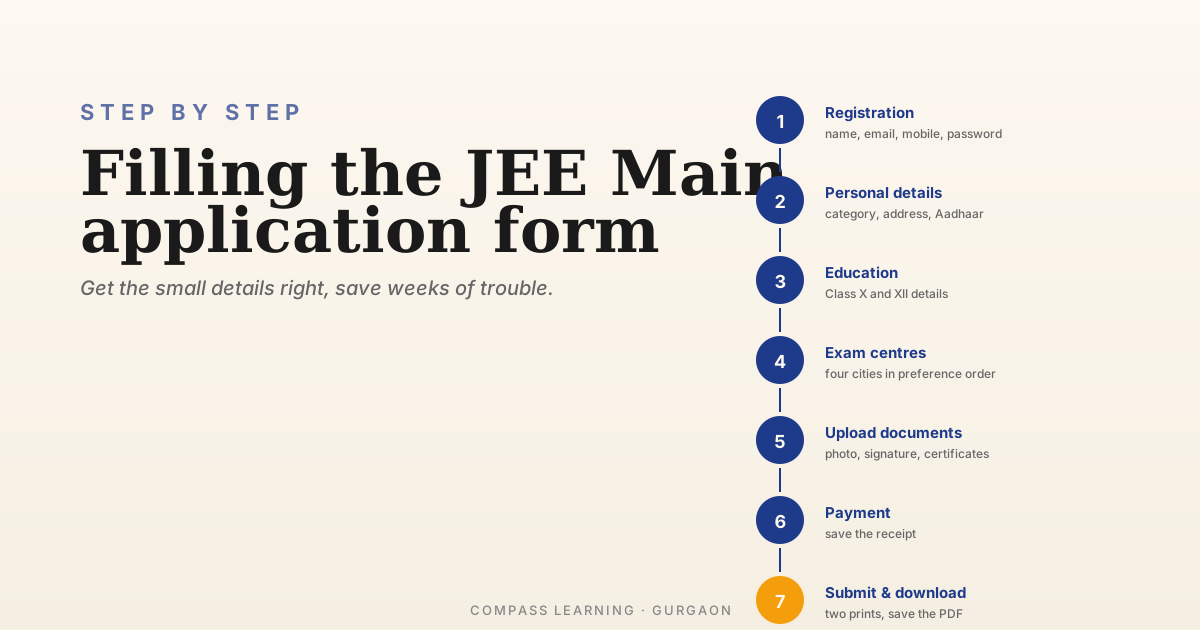
Step 1: Registration
The application portal opens at the JEE Main website. The first action is to register as a new candidate.
You'll be asked for:
- Candidate's name — exactly as it appears on Class X mark-sheet, including order of given/surname and any initials.
- Date of birth.
- Email ID and mobile number.
- A password.
- A security question.
Two specific points to triple-check at this step:
-
The name. This is one of the most common mistakes. The name you enter here will appear on your admit card, scorecard, and follow you through counselling. If your Class X mark-sheet says "AARTI GUPTA" and you register as "Aarti Gupta", that mismatch can flag during document verification later. Match the mark-sheet exactly, including capitalisation if the portal asks.
-
The email and mobile. Use one that's accessible for the next three or four months. Many students use a parent's number; that can work, but the student should still have access. Important reminders — admit card releases, exam day notices — come to these.
After this step you'll get an application number. Save it somewhere safe. You'll need it for every subsequent login.
Step 2: Personal details
This is the longest part of the form. You'll fill in:
- Father's name and Mother's name — full names, no abbreviations.
- Gender.
- Nationality.
- State of eligibility for which you're claiming citizenship/domicile. This affects state quota considerations later. For students from Delhi NCR, this is usually "Delhi" or the state they hold a domicile certificate from.
- Category — General, OBC-NCL, SC, ST, EWS — with the certificate number if applicable.
- PwD status if applicable, with the relevant percentage of disability.
- Identification details — usually Aadhaar.
- Present address and permanent address.
A few things to be careful about here:
- Category certificates must be valid on the date of the exam. For OBC-NCL and EWS, these are reissued each year — a 2024 OBC certificate may not be valid for a 2026 exam. Get a fresh one before filling the form.
- Address fields sometimes have character limits. Plan your address in advance to fit.
- PwD certification has specific medical board requirements; the percentage threshold for benefits depends on the year's rules.
Step 3: Educational details
You'll enter your Class X and Class XII details:
- Class X: Board, year of passing, percentage or CGPA, school name, school code (if known).
- Class XII: Board, year of passing (or "appearing" if you're in XII), percentage or CGPA (if passed), school name, school code.
Two notes:
- If you're currently in Class XII, mark "appearing" — you won't have marks yet. You'll be asked to update later.
- The percentage required for eligibility is set in the information bulletin and is sometimes relaxed for reserved categories. Check before submitting.
Step 4: Choosing exam centres
You'll be asked to pick a small number of preferred cities for the exam — usually four cities, in order of preference. NTA tries to allocate you a centre in one of your chosen cities, but can't guarantee it.
Practical advice:
- Choose cities you can actually reach on exam day. The "I'll figure it out" approach has caught many families on the morning of the exam.
- For Delhi NCR students: Delhi, Faridabad, Ghaziabad, Gurugram, and Noida are all separate centre clusters. Pick the ones closest to your home.
- Avoid choosing a far-away city as a backup. If NTA does allocate it, you have to go.
Step 5: Uploading documents
This is the step that catches the most candidates. The portal will ask for:
- Photograph (specific format and dimensions — see the Document Checklist for exact specs).
- Signature (specific format and dimensions).
- Category certificate if you've claimed one.
- PwD certificate if applicable.
- Class X and XII certificates / mark-sheets (in some years).
The exact file size and dimension specifications are in the information bulletin. They're particular — a photo that's "almost right" will be rejected at the upload step. The Document Checklist article covers how to get each file in the right format using free tools.
A few small but important rules:
- Photo background should be white or light grey, with the face clearly visible. Selfies don't work. A passport-style photo, taken at a studio, is the safest.
- Signature should be in black ink on white paper, scanned, and clean. Avoid signing in a hurry.
- All documents should be legible. A blurry scan of a category certificate can hold up your admission later.
Step 6: Payment
The application fee depends on category and exam paper. You can pay through UPI, debit card, credit card, or net banking. The fee is non-refundable, so confirm your details before paying.
After payment, download the payment confirmation as a PDF and save it. You'll need it as proof if there's any payment-related discrepancy.
Step 7: Submission and confirmation
After payment, the form moves to its final state. You'll be able to download a confirmation page — a single PDF with all your entered details, the photograph and signature you uploaded, and your application number.
Print two copies. Keep one with the student's documents, another with the parents'. Some students also email it to themselves as backup.
After submission: the correction window
NTA usually opens a correction window a few weeks after the form deadline. During this window, you can correct certain fields — most commonly the photograph and signature, sometimes the category, sometimes a typo in name.
Some fields cannot be edited (date of birth, for example). The exact list of editable fields is announced when the window opens.
If you notice an error after submission, wait for the correction window — don't try to submit a second form. Submitting two forms creates a duplicate-candidate problem that's harder to fix than the original mistake.
Common mistakes that cause real problems
The mistakes we see most often in candidates we've helped:
- Name mismatch between Class X mark-sheet and the form.
- Wrong category selected (e.g., OBC-NCL on the form, but no valid OBC-NCL certificate).
- Wrong photo specifications — selfie photos, photos with non-white backgrounds, photos that are blurry or cropped wrong.
- Old category certificate (especially for OBC-NCL and EWS, which need annual renewal).
- Spelling errors in parents' names that don't match official documents.
- A typo in date of birth — which is not editable in the correction window.
Most of these are catchable if you fill the form unhurriedly, ideally with one parent reading the entered details aloud while the student verifies against original documents. An hour of careful filling saves weeks of correction.
A note for first-time form-fillers
If this is the first official form your family is filling for your child, two things to keep in mind:
- The form looks intimidating but is mostly straightforward data entry. Don't be put off by the formality of the language.
- It's worth doing it together — student and parent — even if the student is technically capable of doing it alone. A second pair of eyes catches typos that the original eyes can't see.
Where to read next
For the documents themselves: Document Checklist for Engineering Entrance Forms.
For what JEE Main actually is: JEE Main: A Complete Guide.
For the bigger picture: The Engineering Admissions Roadmap.
For exam day: Exam Day for JEE Main: What to Carry, What to Expect (coming soon).
Have questions about your specific situation?
We're at Ardee City, Sector 52, Gurgaon. Drop by anytime, or give us a call. Always happy to chat through strategy with parents and students — no pitch, no pressure, just a conversation about what makes sense for you.